

Open a link in a Quick Peek
A Quick Peek opens a link on top of the page you’re reading, without adding a tab. Close the Quick Peek to go back, or keep the page if you want it.
A Quick Peek stays inside your window. A link from another app, like Slack or Mail, opens in a Peek, a small window of its own.
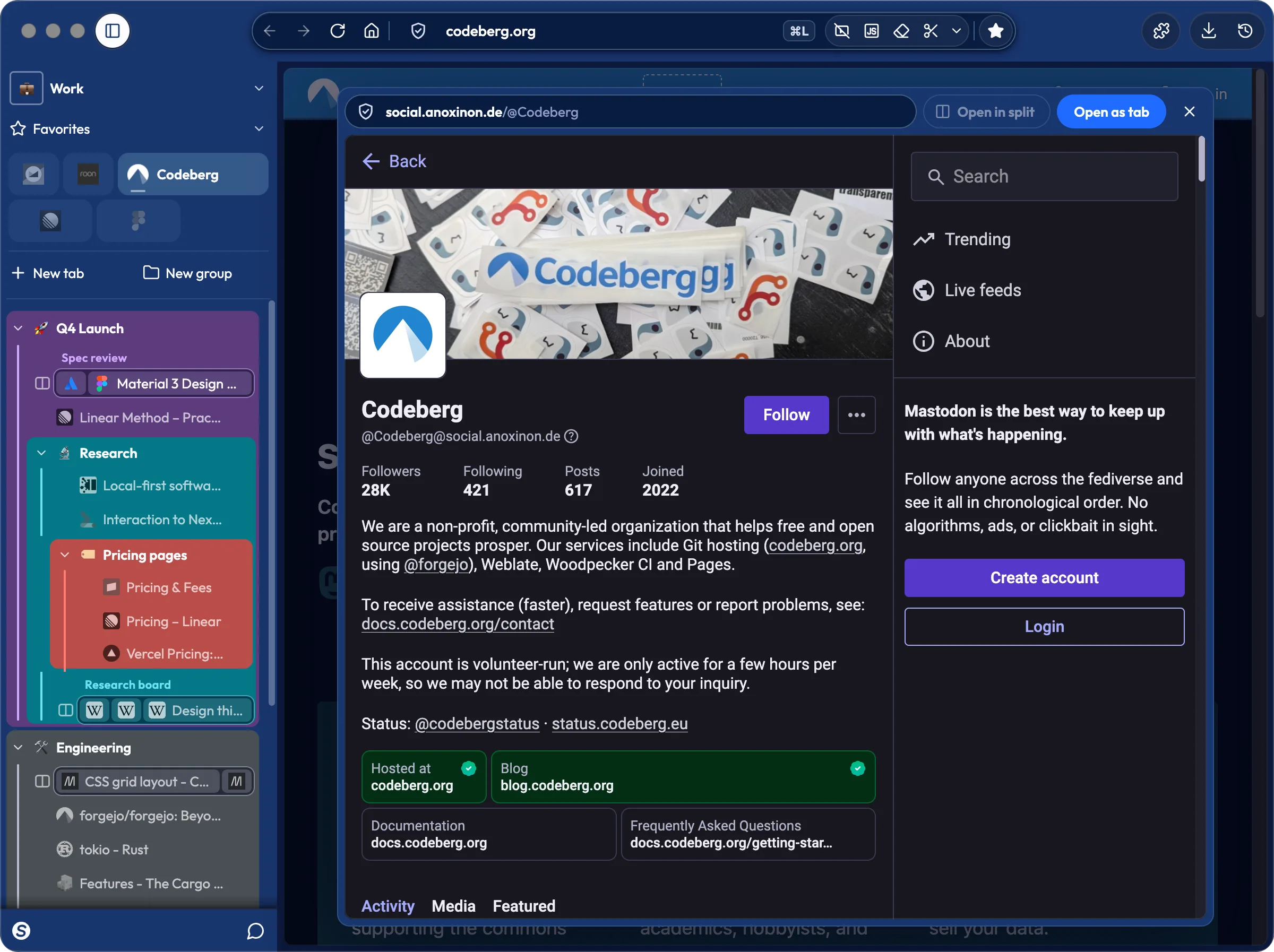
You’re reading a Fastmail thread with a link to a Codeberg issue, and you want a quick look before you answer.
- On the page, ⌥-click (Alt+click on Windows and Linux) the link.
- Read the page in the Quick Peek.
- Press Escape to close the Quick Peek.
To open a Quick Peek from a link’s menu, right-click the link, then choose Open Link in Quick Peek.
Keep the page
Section titled “Keep the page”In the bar at the top of the Quick Peek:
- Open as tab. The page becomes a tab next to the one it came from, and Sval shows the new tab.
- Open in Split. The page shows next to the tab it came from, in a Split. If that tab is already in a Split, the page joins that Split. A Split of four pages has no room, and the button says so.
Details
Section titled “Details”- The Quick Peek uses the sign-ins of the tab it opened from.
- The bar shows the page’s address.
- Clicking outside the Quick Peek or on its close button also closes it. So does switching to another tab, or the tab underneath going to another page.
- A window shows one Quick Peek at a time.
- A page you opened in a Quick Peek goes to History. It doesn’t go to recently closed tabs.
- In a pin, a link to another site opens in a Quick Peek when you click it, with no ⌥ key needed. The bar then starts with “From” and the pin’s name.
- You can open a Quick Peek with ⌥⌘-click or ⇧⌥-click (Ctrl+Alt+click or Shift+Alt+click on Windows and Linux) instead. Go to Settings › Keyboard shortcuts › Links, then select Change next to Open a link in a Quick Peek.
- To turn off Quick Peek, go to Settings › Links › Links in pages and turn off the first switch. Or select Clear next to Open a link in a Quick Peek in Settings › Keyboard shortcuts. The click then does what it does without Sval, and Open Link in Quick Peek leaves the link’s menu. Links from pins have their own switch in Settings › Links: Open links to other sites from a pin in a Quick Peek.
Related pages
Section titled “Related pages”© 2026 Ellm Tree, Inc. Sval is not officially associated with Mozilla or its products. Firefox is a trademark of the Mozilla Foundation in the US and other countries.